下單交易最重要的不外是市場數據要接收正確、而且速度要快(看過國內券商的,就知道我在 說什麼)以及就是下單到市場要快。
這些之外,交易下單軟體平台的功能性對於交易者而言也是一項挺要緊的作戰武器~
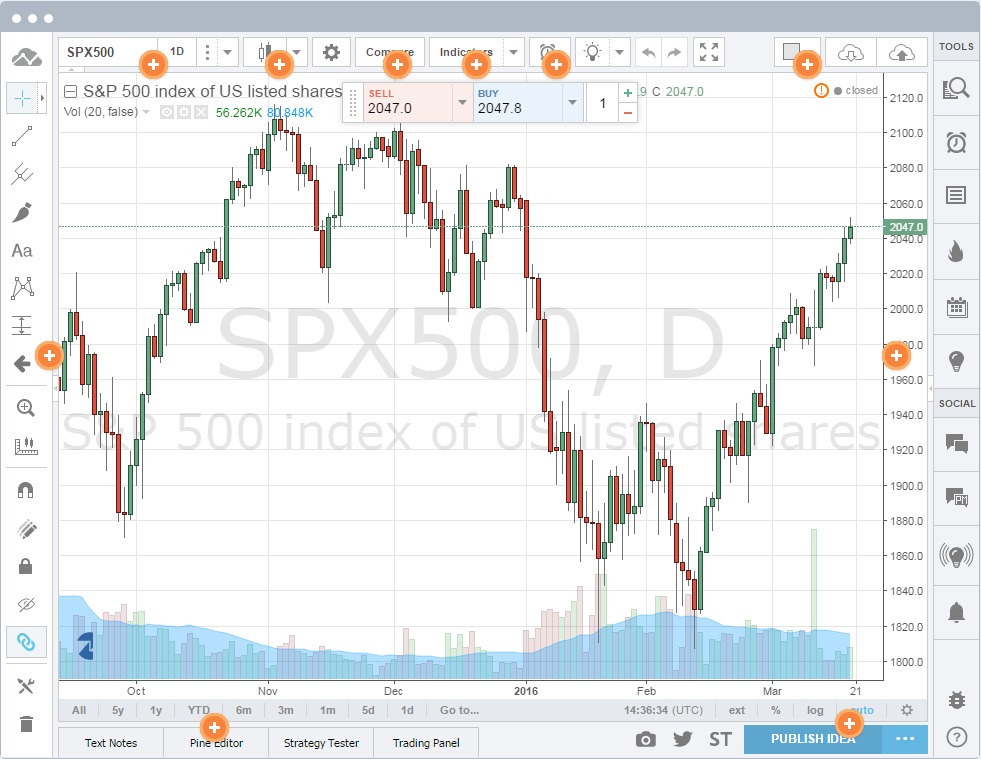
TradingView,AMP Future 新release 的下單平台,以HTML 5和雲端技術可同時支援各行動裝 置(Any OS, Any Device, Anywhere in the World/iPads, iPhones, and
Android/Windows/Linux phones, tablets and computers),亦即隨時都可以登入交易。
摘要:本篇完整解析 2026 年最受台灣投資人關注的美股期貨交易組合—— TradingView + AMP Futures。內容包含 AMP Futures 優勢、費用、交易品種、兒茶級安全性、開戶流程(含圖解)、以及 TradingView 實際下單教學。 同時也會與其他海外期貨商(如 NinjaTrader、Tradovate、Tickmill Futures)做比較,協助你評估哪間最適合長期交易。 文章超過 3000 字,並附有最新開戶連結與完整圖文開戶流程。
📘 【AMP Futures 介紹&開戶流程完整全攻略(含圖解)】
一、為什麼 2026 年美股期貨投資暴增?(台灣投資人最關鍵的三大理由)
台灣投資人對美股期貨需求急速提升,最主要原因包含三點:
- 避開 PDT 限制(Pattern Day Trader Rule) 股票日內交易會受限於 25,000 美金最低資本要求,但期貨完全沒有此限制,低資金也能自由交易。
- 24 小時交易 海外期貨接近全天候,遇到 FOMC、CPI 等重大事件能即時操作,不用等台灣時間凌晨或隔日開盤。
- 槓桿靈活、保證金低 像是 E-mini、Micro 指數期貨保證金遠低於台指期或大台,資金利用效率極高。
因此大量台灣交易者開始思考:
✅ 什麼期貨商最便宜?
✅ 什麼平台最順?
✅ 可以用 TradingView 下單嗎?
而答案就是AMP Futures + TradingView 的組合。
二、什麼是 AMP Futures?為什麼台灣交易者超推?
AMP Futures(AMP Global Clearing)是美國註冊期貨商(FCM),專門提供全球期貨交易服務,尤其在指數期貨(S&P、Nasdaq、Dow、Micro Futures)領域極為受歡迎。 它最為知名的亮點在於:
- 交易成本極低(全美最低之一)
- 可連接超過 50+ 交易軟體
- 包括 TradingView 原生串接
- 免軟體費(取決於你使用的軟體)
- 每日結算透明、保證金清楚、支援國際客戶
對台灣投資者來說,一個最大的優勢是: AMP Futures 是少數支援 TradingView 直接下單的期貨商之一。
三、AMP Futures 手續費與交易成本(2026 最新)
AMP 最大競爭力就是成本透明且低。
下面整理出 2026 年最新 Micro 指數期貨的平均成本(僅參考、實際可能依交易量微調)。
| 品種 | 每邊成本(約) | 優勢 |
|---|---|---|
| MES(Micro S&P 500) | $0.49 ~ $0.79 | 最熱門指數商品 |
| MNQ(Micro Nasdaq) | $0.49 ~ $0.79 | 波動大,日內好操作 |
| MYM(Micro Dow) | $0.49 ~ $0.79 | 穩健、波動較柔和 |
AMP Futures 的特點是:
✅ 無最低入金門檻(但建議至少 1,000 美金以上)
✅ 保證金低
✅ 成本相較 NinjaTrader、Tradovate 更低
四、TradingView + AMP Futures:為什麼是 2026 年最強組合?
TradingView 原本只是一套圖表平台,但近年開始支援實際下單,其中 AMP Futures 是官方支援的交易商之一。
這代表:
- 你的所有期貨單可以在 TradingView 圖表上直接執行
- 停損、停利、OCO 都能直接在圖上拖曳操作
- AMP + TradingView 成本比 NinjaTrader 便宜許多
- 無需安裝軟體、手機就能交易
- 申請 TradingView 模擬帳戶:連結
對台灣交易者來說,最大優點是: 手機版 TradingView 可以 24 小時盯盤、下單、移動停損,自動同步。
五、AMP Futures 開戶流程
完整流程請搭配你的圖示文章 👉 【AMP Futures 介紹&開戶流程完整全攻略(含圖解)】
流程摘要:
- 準備資料:護照、地址證明、基本財務資料
- 填寫線上申請表(約 10–15 分鐘)
- 上傳文件,等待審核(1–3 天)
- 收到 Welcome Email → 取得登入資訊
- 使用 ACH / Wire 匯款入金
- 啟用交易許可與平台登入
流程相對簡單,台灣使用者文件接受度高,通常 1~2 天即可完成。
六、TradingView 實際下單流程(AMP 串接)
TradingView 與 AMP Futures 連線後,你即可在圖表中直接下單。基本下單方式包含:
- 市價單(Market)
- 限價單(Limit)
- 停損單(Stop)
- OCO 組合單
- 在圖表上拖移停損線、停利線
你也能利用 TradingView 的優勢:
- 多時間框架切換(1m~1d)
- 自訂指標與 Pine Script
- 手機、平板、桌機同步
- 重大經濟事件提醒
七、AMP Futures vs NinjaTrader vs Tradovate(2026 最新比較)
| 項目 | AMP Futures | NinjaTrader | Tradovate |
|---|---|---|---|
| 支援 TradingView | ✅ 是 | ❌ 否 | ✅ 是(但費用較高) |
| 交易成本 | ✅ 最低 | 中等 | 偏高(含會費) |
| 軟體費 | 大多數平台免費 | 需買或租授權 | 需會員制 |
| 適合對象 | 日內、波段、小資 | 較專業交易員 | 頻繁交易者 |
八、2026 年 AMP Futures 值得開戶嗎?(結論)
如果你的需求為:
- 低成本交易美股指數期貨(MES/MNQ/ES/NQ)
- 使用 TradingView 下單
- 不想付軟體費
- 想要 24 小時交易+手機操作
- 不受 PDT 限制、不受股票限制
那 AMP Futures 幾乎是 2026 年「最推薦的美國期貨商」。
若需要搭配完整圖解流程,請看: 👉 【AMP Futures 介紹&開戶流程完整全攻略(含圖解)】
如需加入表格、圖示、價差比較或更多開戶 CTA,我可以再補強。
Regular & Advanced Chart Types
TradingView has regular and advanced chart types, each one helps analyze the market at a different angle. A Candlestick chart will show you how price moved within a certain time period (i.e. a minute, or day), and Renko charts will show if the trend is up or down. Learn more about Chart Types on TradingView!
Custom Spread Charts
Spread charts are a powerful tool for tracking custom comparisons, for example the difference between Microsoft and Google stocks. You can build any spread chart on TradingView by typing in a custom formula using (+-*/), i.e. “MSFT + GOOG” Learn more about Spread Charts on TradingView!
50+ Intelligent Drawing Tools
Drawing tools help you understand what stock prices are doing, and track how your predictions turn out. You can write on your chart or do freehand drawings, drag simple trend lines from A to B, apply the widespread Fibonacci and Gann tools, or apply the popular Elliot Waves. Learn more about Drawing Tools on TradingView!
Customized Technical Analysis
TradingView comes with a massive library of over 100 prebuilt technical indicators including Volume Profile! But we realized that even this isn’t enough for all our users and we built the Pine programming language. Pine script allows you to create and share your own custom studies and signals. TradingView comes with over a hundred pre-built studies for an in-depth market analysis, covering the most popular trading concepts and indicators. A key advantage of Pine script is that any study’s code can easily be modified. Nearly any custom indicator can also be created from scratch.
Fundamentals Data
We have a unique toolset of institutional quality fundamental data on US companies. Viewing company financials in the context of history and market coverage lets you put current financials in perspective, especially when compared to peers and the company’s own performance over time.
Compare Symbols
Comparing a stock to the benchmark S&P 500 index is a great way to gauge its performance – to see if it’s doing better or worse than the industry. TradingView lets you compare any stock to any index or any other stock based on % change since the starting point. Learn how to compare symbols on TradingView.
Advanced Price Scaling
When you are ready to get technical, our charts let you set the price scales to match your type of analysis. There are linear, percent and log axes for drastic price movements. You can use two separate price scales at the same time: one for indicators and one for price movements. Read more about scaling options. Right-click on the price scale to see possible options: change scaling type, enable auto-scaling or show another price scale. Right-clicking on indicators lets you choose which scale to use, so several data series with different scaling can co-exist in one chart. You can also drag price and time scales to increase or decrease compression.
Multiple Symbols on the Chart
It’s often useful to search for relationships between different stocks – do they move in tandem or always in opposite directions? With TradingView you can look at different stocks on the same chart, even if one trades at $100 and another is a penny stock. Learn how to add multiple symbols on the single chart on TradingView.
Study Templates
Studies can be assembled into sets to create study templates. Once a template is created, an entire set of studies can be applied to any chart, at any time, with just one click. It is possible to switch between different templates. Learn how to use Study Templates on TradingView.
Extended Trading Hours and Time Zone Options
TradingView allows you to know what’s happening outside of regular trading hours, and lets you stay more informed about the market! You can display data series using either local or exchange timestamps. Right-click on the time scale to change these options. Learn more about Extended Trading Hours on TradingView.
Hot Lists
Pre-built hot lists continuously scan the US stock market to identify best trading opportunities. Hotlists dynamically show different symbols based on the criteria selected, not to be confused with watchlists that always show only the symbols you need to monitor.
Synchronized Watchlists
Keep watch on your favorite stocks in a convenient scanner list. You can add symbols, sort the list and save custom lists under unique names. With TradingView, your watchlists are with you wherever you go, and you can stay on top of the markets on any device that you use TradingView on.
Relevant Real-Time News & Headlines
You see only relevant news next to the stock you are currently looking at (i.e. if you are looking at Facebook chart, only Facebook news will appear). We filter headlines from leading news agencies.
Real-time Conversation
Conversation is a real-time chat, so you can talk to other people looking at the same symbol. In the chat you send links to your charts, and talk about them with people analyzing the same ticker. Conversations let you discuss current market conditions here and now, while publishing charts is your vision of the future.
Publish Chart
Being able to publish and share your ideas is one of the key features of TradingView. Publishing will share your trading idea with the financial web and the investing community so that others can comment and rate it. Learn more about Publishing on TradingView.
海外美期貨券商AMP Futures ----- 超過18款免月費交易軟體下單平台

請先 登入 以發表留言。